Thursday, 5 December 2013

Implementing email functionality in a JSR portlet using Liferay API's

Many a times we have a requirement to implement email functionality in our Portlets.
A simple use case can be the contact us form on your website. When the user submits it, it should send an email to the concerned department.

I am going to explain how to implement this.

I am using Liferay Portal and a JSR compliant portlet. We will be using Liferay's SubscriptionSender class to do the job of sending emails.

Another important thing is we can either use the tmpl file(email template) to do this or use a web content to
create the email template.

The advantage with web content is that it can be localized, which is currently not possible with a tmpl file, at the time of writing this post.

Here are the steps

1. If using a tmpl file create one like email_body.tmpl

The content of  this file can be something like

Tuesday, 8 October 2013

How to include external CSS or JavaScript file to the JSP in your Portlet

If you have an external JS or CSS file and want to include that in your JSP, here is a simple way to do that.

<script language="javascript" src='<%=renderRequest.getContextPath() + "/js/sample.js" %>'>
</script>


<link rel="stylesheet" type="text/css" href="<%=renderRequest.getContextPath() + "/css/sample.css" %>">

The CSS file is located at /webapps/css/

The JS file is located at /webapps/js/

And JSP is located at /webapps/WEB-INF/jsp

Hope this helps.

Friday, 31 May 2013

Applying Listeners to JSR Compliant Portlets

As per the JSR 286 Specification the following Listeners, which work with Servlet Requests, can be applied to requests targeted towards Portlets.
  • ServletContextListener 
  • ServletContextAttributeListener
  • HttpSessionActivationListener
  • HttpSessionAttributeListener
  • HttpSessionBindingListener
  • ServletRequestListener.

For this to work the Container needs to set a variable javax.portlet.lifecycle_phase.

Lets see an example.

Wednesday, 22 May 2013

Using Jenkin's to perform Build and Deploy for our custom Portlet : Setup Continuous Integration

In the last article we saw the steps to create a new JSR 286 Portlet from Scratch.

Now every time we make some change we need to build our project and then deploy it.
How cool it will be if these steps can be taken care of by click of a button.
Automation of such tasks can not just save time but also make us more efficient.

Below is a set of steps which can be used to setup Jenkins and then build Project using that. Its really simple. Jenkins is a Continuous Integration tool for automation of build, test and deploy.

Thursday, 16 May 2013

Create a simple JSR 286 Portlet - Part 2

In the last article we had completed the setup.


Now we will create our first JSR 286 Portlet.

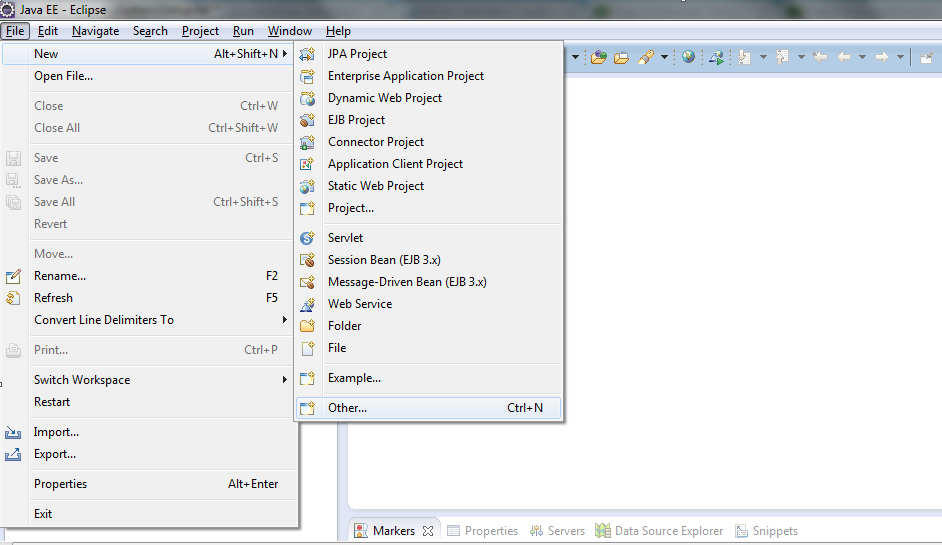
1. In Eclipse navigate and go to File->new->other.


Create a simple JSR 286 Portlet using Maven, Eclipse IDE, MySql - Part 1

The Portlet we are going to create can be run on any Portal Server. I have used Liferay Community Edition since its available for free.

The tools we are going to use are:

1. Java V 1.5 and above.
2. Maven: It makes life so much easier.
3. Eclipse IDE
4. MySQL database
5. Liferay Community Edition bundled with Tomcat: Latest version is available at liferay.com

Monday, 6 May 2013

Comparing Servlets and Portlets Part 3 : Portlet deployment descriptor file


In the last article we saw how a RequestDispatcher works for both Servlets and Portlets.

Difference between a web and a portlet application.

A basic web application will have a web.xml file, Servlet classes and JSP's. The web.xml file helps to configure the Servlets which make the application. It helps a developer to define which URL's will be handled by which Servlets. How security will be applied to these URL's, session management etc.