Saturday, 13 February 2016

Learn about the new Portlet Specification 3.0 or JSR 362

If you are into Portlet Development work you will be happy to learn about the new Portlet Spec Version 3.0, expected to release sometime in 2016.

You might be wondering why this new Specification ?

Continue Reading

Thursday, 7 August 2014

Java - Can you find the sum of numbers in a String

Consider a String "abc67uty89ty". Now can you write a program to calculate the value of 6+7+8+9

There might be other better solutions but here is what I did using Regular expression, which makes this quite easy.

In Java you can use regular expression to search and get index of a pattern. The two primary classes used are Pattern and Matcher.

The expression "\d" I use below is to get numeric values.

Friday, 6 June 2014

Understanding some properties related to Liferay LDAP Import process

Liferay provides an easy way to integrate with LDAP. Using its control panel you can enable LDAP and also add the LDAP server.
There is pretty good documentation around that. Please refer to this wiki link http://goo.gl/7dqgj9

The two things I wanted to discuss in this post are regarding the usage of the following properties

ldap.import.lock.expiration.time and ldap.import.interval

Both these properties can be specified in the portal-ext.properties file.

But the confusion I had was what's the difference between these two.

I started looking at the Liferay Portal 6.2 source code and wanted to share my findings.

Tuesday, 15 April 2014

Resolving Service builder issues in Liferay

Recently I ran into some issues when trying to use Liferay service builder utility. Although I was working with Liferay CE 6.2 this post should be helpful for any Liferay version.

For the first time when I ran service builder it worked fine and generated the tables. But then I changed the namespace entry in service.xml file. This change did not update the database table. So I deleted the table and tried to run service builder again and redeploy the portlet. But this resulted in errors during portlet deployment.

Friday, 11 April 2014

Upload files and access form elements in a custom Portlet - Using multipart/form-data and UploadPortletRequest

This blog post will help you if you are looking to add form upload functionality to your JSP form and then access it in your controller, java class.

For this blog post I have used Liferay portal.

Lets get started. In your Portlet JSP please add enctype="multipart/form-data" to the form tag.

The complete JSP code is provided below for reference


Next lets go to our controller class. Once the form is submitted this class will come into picture.

First we need to get UploadPortletRequest object using the ActionRequest object. This is the object we will use to access all the form elements.

UploadPortletRequest uploadRequest = PortalUtil.getUploadPortletRequest(request);

String docTitle = ParamUtil.getString(uploadRequest, "docTitle");
String comments= ParamUtil.getString(uploadRequest, "docComments");

I have used Liferay's ParamUtil which is a helper class. But you can directly get these parameters from the request object using request.getParameter();

Also you can extract file details using

String fileName = uploadRequest.getFileName("documentFile");
InputStream inputStream = uploadRequest.getFileAsStream("documentFile");

That's it.

Thursday, 10 April 2014

Understanding and using the Liferay Document Library - Part 2

In Part 1 of this blog post we saw some basic concepts around how document library can be used, also the database side of it like the tables being used and also the file structure.

In this post I will show you how to upload a document using Liferay's  document library API.

To get started create a MVC Portlet.

Understanding and using the Liferay Document Library - Part 1

In this two part blog post I will try to explain how to use the Liferay Document Library to store and manage your documents.

I will be using Liferay version 6.2 CE to illustrate this. Also I won't go into the meta-data details for the documents, for that you can refer to the user guide.

In the first part I will discuss some concepts related to the Document Library. Like the tables being used etc.

In the second part I will show you how to use the API from a Portlet. If you want to directly see that then here is the link.

Wednesday, 19 March 2014

Adding workflow to a custom portlet in Liferay 6.2

In this blog post I am going to give an overview on how you can integrate workflow feature in your portlet using Liferay API's.

Please Note: This blog will not be related to configuring out of the box Kaleo workflow portlet. By configuring I mean adding new workflows. For this please refer to the Liferay documentation.

In this post I will layout the basic steps to get workflow feature integrated in your custom portlet. I used Liferay v 6.2

Things have changed in the new Liferay version, especially the look and feel. We will discuss more about the new features in another article.

Here are the basic steps to get workflow integrated

Thursday, 5 December 2013

Implementing email functionality in a JSR portlet using Liferay API's

Many a times we have a requirement to implement email functionality in our Portlets.
A simple use case can be the contact us form on your website. When the user submits it, it should send an email to the concerned department.

I am going to explain how to implement this.

I am using Liferay Portal and a JSR compliant portlet. We will be using Liferay's SubscriptionSender class to do the job of sending emails.

Another important thing is we can either use the tmpl file(email template) to do this or use a web content to
create the email template.

The advantage with web content is that it can be localized, which is currently not possible with a tmpl file, at the time of writing this post.

Here are the steps

1. If using a tmpl file create one like email_body.tmpl

The content of  this file can be something like

Tuesday, 8 October 2013

How to include external CSS or JavaScript file to the JSP in your Portlet

If you have an external JS or CSS file and want to include that in your JSP, here is a simple way to do that.

<script language="javascript" src='<%=renderRequest.getContextPath() + "/js/sample.js" %>'>
</script>


<link rel="stylesheet" type="text/css" href="<%=renderRequest.getContextPath() + "/css/sample.css" %>">

The CSS file is located at /webapps/css/

The JS file is located at /webapps/js/

And JSP is located at /webapps/WEB-INF/jsp

Hope this helps.

Friday, 31 May 2013

Applying Listeners to JSR Compliant Portlets

As per the JSR 286 Specification the following Listeners, which work with Servlet Requests, can be applied to requests targeted towards Portlets.
  • ServletContextListener 
  • ServletContextAttributeListener
  • HttpSessionActivationListener
  • HttpSessionAttributeListener
  • HttpSessionBindingListener
  • ServletRequestListener.

For this to work the Container needs to set a variable javax.portlet.lifecycle_phase.

Lets see an example.

Wednesday, 22 May 2013

Using Jenkin's to perform Build and Deploy for our custom Portlet : Setup Continuous Integration

In the last article we saw the steps to create a new JSR 286 Portlet from Scratch.

Now every time we make some change we need to build our project and then deploy it.
How cool it will be if these steps can be taken care of by click of a button.
Automation of such tasks can not just save time but also make us more efficient.

Below is a set of steps which can be used to setup Jenkins and then build Project using that. Its really simple. Jenkins is a Continuous Integration tool for automation of build, test and deploy.

Thursday, 16 May 2013

Create a simple JSR 286 Portlet - Part 2

In the last article we had completed the setup.


Now we will create our first JSR 286 Portlet.

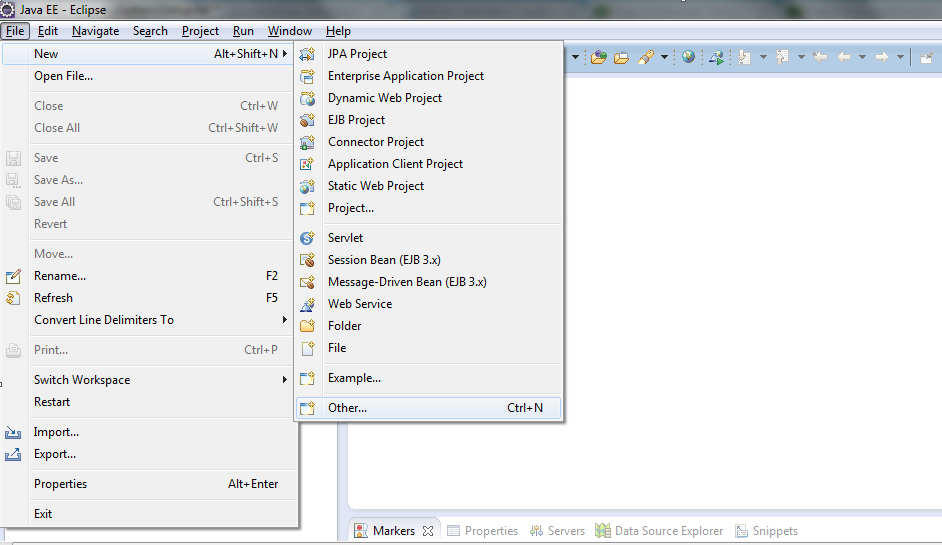
1. In Eclipse navigate and go to File->new->other.


Create a simple JSR 286 Portlet using Maven, Eclipse IDE, MySql - Part 1

The Portlet we are going to create can be run on any Portal Server. I have used Liferay Community Edition since its available for free.

The tools we are going to use are:

1. Java V 1.5 and above.
2. Maven: It makes life so much easier.
3. Eclipse IDE
4. MySQL database
5. Liferay Community Edition bundled with Tomcat: Latest version is available at liferay.com

Monday, 6 May 2013

Comparing Servlets and Portlets Part 3 : Portlet deployment descriptor file


In the last article we saw how a RequestDispatcher works for both Servlets and Portlets.

Difference between a web and a portlet application.

A basic web application will have a web.xml file, Servlet classes and JSP's. The web.xml file helps to configure the Servlets which make the application. It helps a developer to define which URL's will be handled by which Servlets. How security will be applied to these URL's, session management etc.

Comparing Servlets and Portlets Part 2 : Using RequestDispatcher


In the last article we saw how we create a simple Servlet or a Portlet by implementing or extending appropriate interfaces and classes.

Lets continue to see what other differences are there.

RequestDispatcher

Unlike a Servlet where we can use either ServletRequest or ServletContext to get a RequestDispatcher object in a Portlet we can only use the PortletContext to do that. Just to refresh your memory RequestDispatcher can be used to forward the request to another Servlet or a JSP for further processing.

Friday, 3 May 2013

Comparing Servlets and Portlets Part 1 : Understanding the similarities and differences


People familiar with Servlet technology will be able to relate to Portlets. The concepts are more or less the same for both the technologies.

Lets do a quick walkthrough:

To start with the lets talk about their containers.

A container provides the environment in which the application can run. For running a servlet we will need a web application container like Tomcat.
On similar lines for a Portlet we need a Portlet Container. Most of the Portals today come with an inbuilt Portlet container to serve requests.

Thursday, 2 May 2013

Article 1: My take on the current Portal Industry and various Job roles


In this article I will try to briefly sum up my experiences, so far, with the Portal and some of the confusions surrounding it.
Its a bigger topic and I might use some other posts to cover this. But here is a gentle introduction.

Around 5-6 years back when I started on my first Portal project the market was picking up and was a buzz with Portal solutions such as Liferay.
It was understandable because Portals allowed a company to make better websites and at the same time display aggregated content.
I don't see much difference even today except that the Portal market is growing and getting better each passing day. The only problem is
lack of support and good resources to meet the current market needs. So while Liferay has become stronger in all these years, thanks to
a ton of features and being open source, its not quite easy to find good resources who can help customize it for specific needs.


New Series of articles on Portal and Portlets


It has been quite a while since my last Post. During all this time I had the opportunity to work with several portal projects for various clients. In the next series of posts I will try to share my experiences so far, on various Portal and Portlet related topics.
I believe most of you must be using the new JSR 286 spec to create Portlets, so in the examples that I will present I will try to use this spec.
I will try to consolidate this Post with all the articles that I will publish for easy navigation. So it might be helpful to just  bookmark this Post.

List of articles:

Article 1: My take on the current Portal Industry and various Job roles

Comparing Servlets and Portlets Part 1 : Understanding the similarities and differences

Comparing Servlets and Portlets Part 2 : Using RequestDispatcher


Monday, 16 November 2009

Create a Struts Portlet using Liferay Plugin Sdk

There is an article available at Liferay Wiki to help you develop a Struts Based Portlet using there Plugin SDK, but chances are pretty high that the article alone wont suffice.

Here are a few problems you might face when you develop a Struts based Portlet.

1. You might get errors for ActionForward, ActionMapping and so on.
2. Your project will have compilation problems.

Here are a few simple steps to create a Struts Based portlet: